Like transponders, you can create a list of RFID Chips with a short number that points to the long number of a chip making it easier to apply them to competitors.
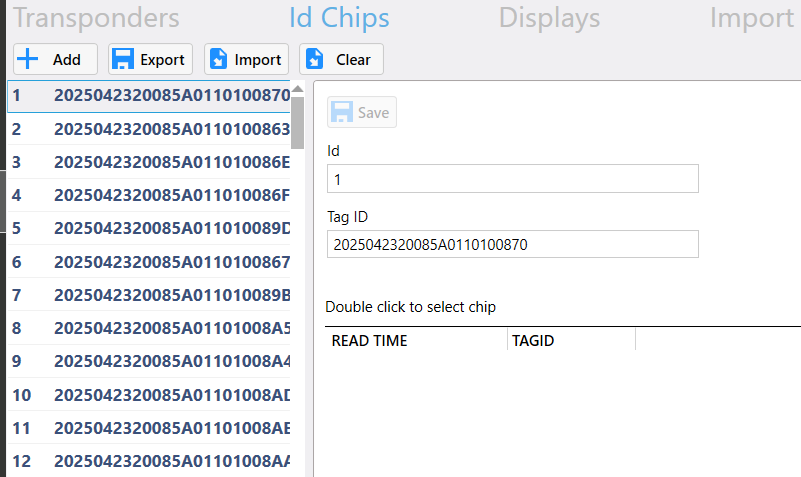
You can import your RFID Chips if you have a Comma Separated Value spreadsheet (.csv) with them listed. You can create a CSV file in Excel making sure it contains two columns. Column A should be the short ID number and Column B is the unique long RFID number.
If you have any existing transponders, clicking the Clear button will remove the current list. You should click Export to save a copy of these if you need them again in the future, before and inputting/importing new IDs into the system.
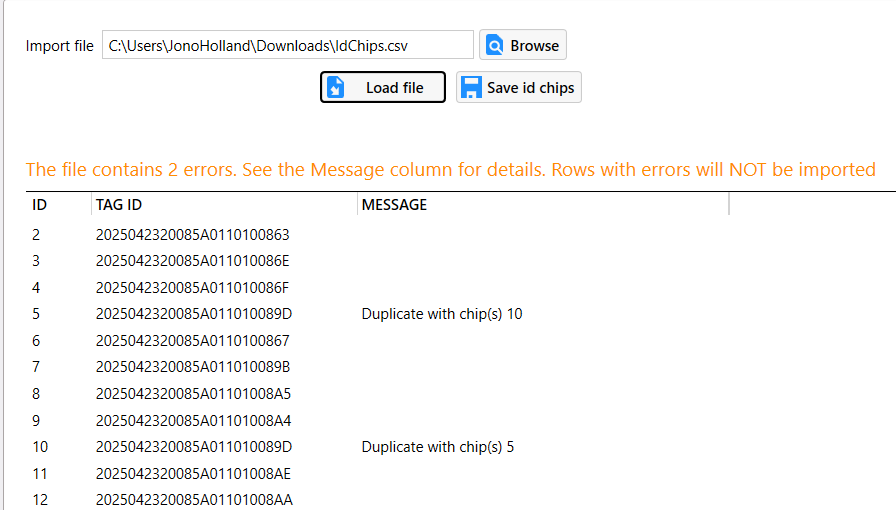
To import a list of RFID Chips click the Import button to load the import page. Click Browse and locate your CSV file contain the list of your RFID Chips. Click "Load File" to load the data into the Timing application. These numbers will be checked to ensure the data is valid and that there are no duplicates. If any of the rows have any errors an explanation will be shown in the message column. Any rows that contain any errors will be ignored and will not be imported into the Timing. If you are happy, click "Save id chips" to save list into the Timing.
Was this article helpful?
That’s Great!
Thank you for your feedback
Sorry! We couldn't be helpful
Thank you for your feedback
Feedback sent
We appreciate your effort and will try to fix the article